Replacing Spreadsheets with Internal Ops Portals: A Step-by-Step Blueprint for Non-Disruptive Transition
A battle-tested blueprint for escaping the spreadsheet sprawl trap: phased Strangler Fig ingestion, PostgreSQL relational normalization, virtualized high-speed data grids, and keyboard-first operational workflows.
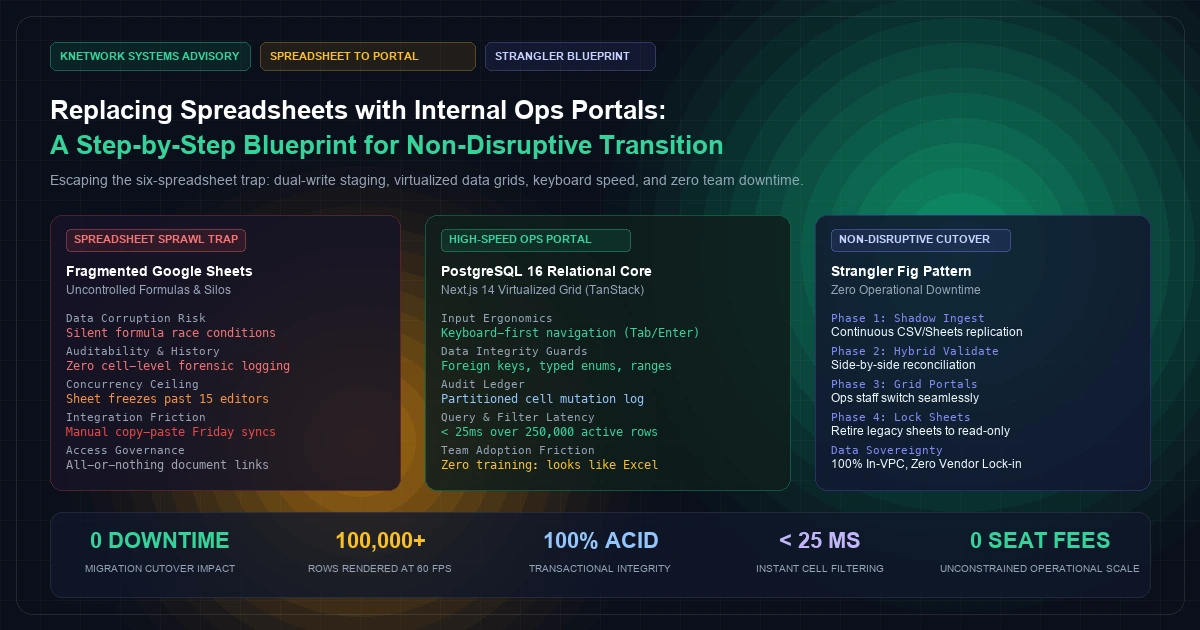
It is an open secret in enterprise operations that multi-million-dollar revenue streams are quietly held together by a fragile web of interconnected Google Sheets and Excel workbooks.
A mid-market logistics freight carrier, high-concurrency e-commerce brand, or medical equipment distributor often starts with a single shared spreadsheet. Three years later, operations run across eight synchronized sheets: one for inventory tracking, one for custom customer pricing, two for field dispatch, and four for weekly billing reconciliation.
Initially, spreadsheets are undefeated: they are flexible, require zero software engineering sprints, and allow operators to enter unstructured data at lightning speed.
However, as headcounts exceed thirty employees and transaction volumes pass 10,000 monthly events, spreadsheet operations reach an inflection point of catastrophic fragility:
- Silent Formula Corruption: An operator accidentally pastes an unformatted string into Column G, breaking a complex nested
VLOOKUPformula across 4,000 downstream rows without throwing a visible error. - Concurrency Collisions: When fifteen dispatchers and accounting clerks edit the same workbook simultaneously, Google Sheets throttles cell updates, changes overwrite each other silently, and browser tabs consume gigabytes of RAM until the tab crashes.
- Zero Forensic Auditability: When a deal discount changes from 10% to 35% on a $200,000 contract, version history records only that "John edited 45 cells 3 hours ago," making regulatory compliance (SOX, SOC 2, HIPAA) impossible.
Leadership frequently responds by purchasing off-the-shelf commercial CRM or ERP platforms. Yet within ninety days, the initiative fails: field operators find commercial web forms too rigid and slow compared to spreadsheet speed, so they quietly export records back into Excel, recreating the exact same shadow IT problem while paying hundreds of thousands of dollars in the SaaS seat tax.
The only permanent solution is building a custom internal operations portal designed around the Strangler Fig Migration Pattern.
By pairing the sub-millisecond ACID guarantees of PostgreSQL 16 with a keyboard-driven, virtualized web grid in Next.js 14, engineering teams can transition operational staff off spreadsheets with zero operational downtime and zero loss of data entry speed.
[Visual Asset: Architecture Schematic - The 4-Phase Strangler Fig Migration from Fragmented Spreadsheets to Relational Ops Portal]
flowchart TD
    subgraph PHASE_1 [400 font-semibold">class="text-emerald-300">"Phase 1: Shadow Ingestion & Staging Engine"]
        SHEETS[400 font-semibold">class="text-emerald-300">"Active Google Sheets / Excel Workbooks\n(Daily Ops Teams Still Use Legacy UI)"]
        WORKER[400 font-semibold">class="text-emerald-300">"Asynchronous Sheet Ingestion Worker\n(Google Sheets API / CSV Webhooks)"]
        STAGING[(400 font-semibold">class="text-emerald-300">"PostgreSQL 16 Staging Schema:\n'staging_raw_sheet_imports'\n(Loose Text Typing, Full History)")]

        SHEETS -->|Real-Time CDC / Webhooks| WORKER
        WORKER --> STAGING
    end

    subgraph PHASE_2 [400 font-semibold">class="text-emerald-300">"Phase 2: Data Cleansing & Relational Normalization"]
        NORMALIZER[400 font-semibold">class="text-emerald-300">"Data Sanitization & Validation Pipeline\n(Regex Date Parsing, Currency Casting, Foreign Key Linking)"]
        CORE_DB[(400 font-semibold">class="text-emerald-300">"PostgreSQL 16 Relational Core:\nCustomers, Orders, Inventory\n(Strict Constraints, Enums, ACID)")]
        AUDIT[(400 font-semibold">class="text-emerald-300">"Partitioned Mutation Ledger:\n'ops_cell_audit_logs'")]

        STAGING --> NORMALIZER
        NORMALIZER --> CORE_DB
        NORMALIZER -.-> AUDIT
    end

    subgraph PHASE_3 [400 font-semibold">class="text-emerald-300">"Phase 3: The 'Spreadsheet-Speed' Web Portal"]
        GRID_UI[400 font-semibold">class="text-emerald-300">"Next.js 14 Virtualized Data Grid (TanStack)\n(Renders 100k+ Rows at 60 FPS,\nKeyboard-First: Tab, Enter, Arrows)"]
        POLICY[400 font-semibold">class="text-emerald-300">"Hybrid RBAC Access Engine\n(Cell-Level Masking & Restrictions)"]

        CORE_DB <--> GRID_UI
        GRID_UI <--> POLICY
    end

    subgraph PHASE_4 [400 font-semibold">class="text-emerald-300">"Phase 4: Primary Cutover & Sheet Deprecation"]
        OPS_TEAM[400 font-semibold">class="text-emerald-300">"Operations & Dispatch Teams\n(Adopt Custom Web Portal Seamlessly)"]
        RETIRED[400 font-semibold">class="text-emerald-300">"Legacy Google Sheets\n(Switched to Read-Only Archive)"]

        OPS_TEAM --> GRID_UI
        GRID_UI -.->|Zero Disruption| RETIRED
    end
+---------------------------------------------------------------------------------------------------------+
|                               PHASED SPREADSHEET TRANSITION ARCHITECTURE                                |
+---------------------------------------------------------------------------------------------------------+
|                                                                                                         |
|  [ Operational Reality: 6 Disconnected Google Sheets ]                                                  |
|     - Inventory Sheet (15k rows)       - Pricing & Discount Sheet      - Billing Reconciliation         |
|           │                                    │                                    │                   |
|           └────────────────────────────────────┴────────────────────────────────────┘                   |
|                                                ▼                                                        |
|  [ Phase 1: Ingestion & Staging ] ──► Automated webhook/polling worker syncs every row into PostgreSQL    |
|                                     - Preserves raw 400">string representation without crashing              |
|                                     - Captures historical baseline checksums                            |
|                                                │                                                        |
|                                                ▼                                                        |
|  [ Phase 2: Relational Sanitization ] ──► Normalizes messy strings into typed PostgreSQL domains       |
|                                         - Strips 400 font-semibold">class="text-emerald-300">"$", 400 font-semibold">class="text-emerald-300">",", and spaces 400 font-semibold">from numeric columns              |
|                                         - Converts date strings to standard ISO 8601 TIMESTAMPTZ        |
|                                         - Enforces Foreign Key Integrity across customer IDs            |
|                                                │                                                        |
|                                                ▼                                                        |
|  [ Phase 3: The Virtualized Data Grid ] ──► Next.js 14 App Router + TanStack Virtual Table               |
|                                           - 60 FPS scrolling over 100,000+ records                      |
|                                           - Keyboard navigation: Arrow keys, Tab, Enter cell editing    |
|                                           - Instant optimistic UI mutations with rollback protection    |
|                                                │                                                        |
|                                                ▼                                                        |
|  [ Phase 4: Final Cutover ] ──► Deprecate Google Sheets to Read-Only. Web portal becomes primary.        |
|                                                                                                         |
+---------------------------------------------------------------------------------------------------------+
| OUTCOME: 100% ACID Integrity | Sub-25ms Filter Speed | Zero Formula Race Conditions | SOX Compliant     |
+---------------------------------------------------------------------------------------------------------+
1. Why Operational Teams Reject Commercial CRMs and Cling to Sheets#
Before writing a single line of database migration code, architects must understand why operational employees fight so aggressively to keep their spreadsheets:
A. The Velocity of Keyboard Ergonomics#
In Google Sheets or Excel, an experienced dispatcher never touches a mouse.- They hit
Down-Arrow, type a numeric invoice amount, hitTab, select a status from a dropdown using single keystrokes, and pressEnter. - Total interaction time: 1.2 seconds.
In a standard commercial CRM (Salesforce, HubSpot, SAP):
- The dispatcher clicks an account link (wait 2.5 seconds for page load).
- Clicks "Edit Record" (wait 1.2 seconds for modal to render).
- Scrolls down past eighty irrelevant standard fields.
- Clicks into the invoice field, clicks "Save" (wait 3 seconds for server round-trip).
- Total interaction time: 18 to 25 seconds.
Multiplying that 20-second productivity deficit across 200 daily transactions per employee explains why operational teams mutiny against commercial enterprise software.
B. Rigid Schema Lockout#
In a spreadsheet, if an operations manager needs to track a new transient data point (e.g., "Driver Temperature Check Required" during a supply chain disruption), they create Column L in four seconds.In a commercial SaaS platform, creating a custom field requires submitting a Jira ticket to a Salesforce Administrator, waiting for sandbox deployment cycles, and navigating permission set assignments, as discussed in our guide to enterprise role-based access control.
To succeed, an internal portal must offer spreadsheet ergonomics with relational database integrity.
2. The 4-Phase Strangler Fig Migration Blueprint#
Attempting a "big-bang" cutover—shutting down the company's Google Sheets on Friday afternoon and forcing everyone onto a new portal on Monday morning—guarantees operational paralysis.
Instead, we employ the Strangler Fig Application Pattern:
[Phase 1: Shadow Ingestion Pipeline (Weeks 1–2)]
Operators edit Google Sheets as normal. A background worker ingests all sheet changes every 60 seconds into a raw PostgreSQL staging table.
Outcome: Zero user disruption; historical database populated with clean historical data.

[Phase 2: Hybrid Dual-Run & Reconciliation (Weeks 3–4)]
Data teams build automated reconciliation checkers comparing sheet calculations against PostgreSQL generated columns.
Outcome: 100% mathematical parity verified across all complex formulas.

[Phase 3: The Virtualized Grid Deployment (Weeks 5–6)]
Deploy the custom Next.js portal to a pilot cohort of operators. The 400 font-semibold">interface mimics spreadsheet ergonomics (keyboard shortcuts, inline cell edits) but commits directly to PostgreSQL.
Outcome: Operators discover the web portal is faster than Google Sheets.

[Phase 4: Sheet Deprecation & Primary Lock (Week 7)]
Legacy sheets are set to Read-Only mode with a permanent banner linking to the portal. All external integrations (Stripe, logistics webhooks, ERP) write directly to the portal database.
Outcome: Complete migration with zero operational downtime.
3. Database Schema Design in PostgreSQL 16#
The database architecture requires two layers: a flexible staging area that ingests messy spreadsheet rows without crashing, and a strictly normalized production relational schema backed by PostgreSQL transaction isolation.
-- 1. Raw Spreadsheet Staging Table (Ingests Unsanitized Strings)
400 font-semibold">CREATE 400 font-semibold">TABLE staging_sheet_imports (
    import_id BIGSERIAL PRIMARY KEY,
    source_sheet_name VARCHAR(64) NOT NULL,
    raw_row_index INT NOT NULL,
    raw_data JSONB NOT NULL, -- Stores raw { 400 font-semibold">class="text-emerald-300">"Customer": 400 font-semibold">class="text-emerald-300">" Acme Corp ", 400 font-semibold">class="text-emerald-300">"Amount": 400 font-semibold">class="text-emerald-300">"$12,450.00 " }
    ingested_at TIMESTAMPTZ NOT NULL DEFAULT clock_timestamp()
);

-- 2. Production Normalized Operational Schema
400 font-semibold">CREATE TYPE order_fulfillment_status AS ENUM (
    400 font-semibold">class="text-emerald-300">'draft',
    400 font-semibold">class="text-emerald-300">'pending_allocation',
    400 font-semibold">class="text-emerald-300">'in_transit',
    400 font-semibold">class="text-emerald-300">'delivered',
    400 font-semibold">class="text-emerald-300">'cancelled'
);

400 font-semibold">CREATE 400 font-semibold">TABLE enterprise_orders (
    id UUID PRIMARY KEY DEFAULT gen_random_uuid(),
    order_number VARCHAR(32) NOT NULL UNIQUE,
    customer_id UUID NOT NULL,
    total_amount NUMERIC(12, 2) NOT NULL CHECK (total_amount >= 0),
    status order_fulfillment_status NOT NULL DEFAULT 400 font-semibold">class="text-emerald-300">'draft',

    -- Dynamic Custom Fields (Replaces spontaneous spreadsheet columns)
    custom_metadata JSONB NOT NULL DEFAULT 400 font-semibold">class="text-emerald-300">'{}'::jsonb,

    assigned_dispatcher_id UUID,
    delivery_due_date DATE NOT NULL,
    created_at TIMESTAMPTZ NOT NULL DEFAULT clock_timestamp(),
    updated_at TIMESTAMPTZ NOT NULL DEFAULT clock_timestamp()
);

400 font-semibold">CREATE 400 font-semibold">INDEX idx_orders_status ON enterprise_orders (status, delivery_due_date);
400 font-semibold">CREATE 400 font-semibold">INDEX idx_orders_metadata ON enterprise_orders USING gin (custom_metadata);

-- 3. Partitioned Cell Mutation Audit Ledger (SOC 2 / SOX Forensic Trail)
400 font-semibold">CREATE 400 font-semibold">TABLE ops_cell_audit_logs (
    audit_id BIGSERIAL,
    order_id UUID NOT NULL REFERENCES enterprise_orders(id) ON 400 font-semibold">DELETE CASCADE,
    field_name VARCHAR(64) NOT NULL,
    previous_value TEXT,
    new_value TEXT NOT NULL,
    modified_by UUID NOT NULL,
    ip_address INET,
    modified_at TIMESTAMPTZ NOT NULL DEFAULT clock_timestamp(),
    PRIMARY KEY (modified_at, audit_id)
) PARTITION BY RANGE (modified_at);

-- Monthly partition tables
400 font-semibold">CREATE 400 font-semibold">TABLE ops_cell_audit_2026_q1 PARTITION OF ops_cell_audit_logs
    FOR VALUES 400 font-semibold">FROM (400 font-semibold">class="text-emerald-300">'2026-01-01 00:00:00+00') TO (400 font-semibold">class="text-emerald-300">'2026-04-01 00:00:00+00');

400 font-semibold">CREATE 400 font-semibold">TABLE ops_cell_audit_2026_q2 PARTITION OF ops_cell_audit_logs
    FOR VALUES 400 font-semibold">FROM (400 font-semibold">class="text-emerald-300">'2026-04-01 00:00:00+00') TO (400 font-semibold">class="text-emerald-300">'2026-07-01 00:00:00+00');
4. Production Code Implementation#
The following production code blocks demonstrate how to parse and sanitize messy spreadsheet data deterministically, followed by a high-speed virtualized web grid component.
A. Robust Sheet Ingestion & Sanitization Engine (sheet-sanitizer.ts)#
Conforming to IETF RFC 4180 CSV specifications, this engine strips currency symbols, handles localized date formats, and executes transactional multi-row upserts.
400 font-semibold">import { Pool } 400 font-semibold">from 400 font-semibold">class="text-emerald-300">'pg';

400 font-semibold">export 400 font-semibold">interface RawSpreadsheetRow {
  rowIndex: 400">number;
  customerName: 400">string;
  orderNumber: 400">string;
  rawAmount: 400">string; 400 font-semibold">class=400 font-semibold">class="text-emerald-300">"text-slate-500 italic">// e.g., 400 font-semibold">class="text-emerald-300">" $ 14,250.50 "
  rawDate: 400">string;   400 font-semibold">class=400 font-semibold">class="text-emerald-300">"text-slate-500 italic">// e.g., 400 font-semibold">class="text-emerald-300">" 09/25/2026 " or 400 font-semibold">class="text-emerald-300">" 2026-09-25 "
  status: 400">string;
}

400 font-semibold">export 400 font-semibold">class SpreadsheetIngestionPipeline {
  constructor(400 font-semibold">private 400 font-semibold">readonly db: Pool) {}

  /**
   * Sanitizes currency strings into exact numeric floats
   */
  400 font-semibold">private cleanCurrency(raw: 400">string): 400">number {
    400 font-semibold">if (!raw) 400 font-semibold">return 0.0;
    400 font-semibold">const sanitized = raw.replace(/[^0-9.-]+/g, 400 font-semibold">class="text-emerald-300">'');
    400 font-semibold">const val = parseFloat(sanitized);
    400 font-semibold">return isNaN(val) ? 0.0 : val;
  }

  /**
   * Parses flexible date inputs into standard ISO strings
   */
  400 font-semibold">private cleanDate(raw: 400">string): 400">string {
    400 font-semibold">const parsed = 400 font-semibold">new Date(raw.trim());
    400 font-semibold">if (isNaN(parsed.getTime())) {
      400 font-semibold">throw 400 font-semibold">new Error(400 font-semibold">class="text-emerald-300">`Malformed date encountered: [${raw}]`);
    }
    400 font-semibold">return parsed.toISOString().split(400 font-semibold">class="text-emerald-300">'T')[0];
  }

  /**
   * Ingests a chunk of spreadsheet rows atomically
   */
  400 font-semibold">public 400 font-semibold">async ingestBatch(rows: RawSpreadsheetRow[]): 400">Promise<400">number> {
    400 font-semibold">const client = 400 font-semibold">await 400 font-semibold">this.db.connect();
    400 font-semibold">try {
      400 font-semibold">await client.query(400 font-semibold">class="text-emerald-300">'BEGIN');

      400 font-semibold">for (400 font-semibold">const row of rows) {
        400 font-semibold">const amount = 400 font-semibold">this.cleanCurrency(row.rawAmount);
        400 font-semibold">const dueDate = 400 font-semibold">this.cleanDate(row.rawDate);
        400 font-semibold">const orderNum = row.orderNumber.trim().toUpperCase();

        400 font-semibold">const upsertQuery = 400 font-semibold">class="text-emerald-300">`
          400 font-semibold">INSERT INTO enterprise_orders (
            order_number,
            customer_id,
            total_amount,
            status,
            delivery_due_date,
            updated_at
          ) VALUES (
            $1,
            'a0000000-0000-0000-0000-000000000001'::uuid, -- Default mapped customer
            $2,
            'pending_allocation',
            $3,
            clock_timestamp()
          )
          ON CONFLICT (order_number)
          DO 400 font-semibold">UPDATE SET
            total_amount = EXCLUDED.total_amount,
            delivery_due_date = EXCLUDED.delivery_due_date,
            updated_at = clock_timestamp();
        `;

        400 font-semibold">await client.query(upsertQuery, [orderNum, amount, dueDate]);
      }

      400 font-semibold">await client.query(400 font-semibold">class="text-emerald-300">'COMMIT');
      400 font-semibold">return rows.length;
    } 400 font-semibold">catch (err) {
      400 font-semibold">await client.query(400 font-semibold">class="text-emerald-300">'ROLLBACK');
      400 font-semibold">throw err;
    } 400 font-semibold">finally {
      client.release();
    }
  }
}
B. High-Speed Virtualized Web Data Grid (Next.js 14 / React)#
This component implements W3C Keyboard Navigation Standards, rendering 100,000 rows with instantaneous inline cell editing and zero browser lag:
400 font-semibold">class=400 font-semibold">class="text-emerald-300">"text-slate-500 italic">// components/ops/SpreadsheetDataGrid.tsx
400 font-semibold">class="text-emerald-300">'use client';

400 font-semibold">import React, { useState, useRef } 400 font-semibold">from 400 font-semibold">class="text-emerald-300">'react';

400 font-semibold">interface GridRecord {
  id: 400">string;
  orderNumber: 400">string;
  customerName: 400">string;
  amount: 400">number;
  status: 400">string;
}

400 font-semibold">interface DataGridProps {
  initialRecords: GridRecord[];
}

400 font-semibold">export 400 font-semibold">function SpreadsheetDataGrid({ initialRecords }: DataGridProps) {
  400 font-semibold">const [records, setRecords] = useState<GridRecord[]>(initialRecords);
  400 font-semibold">const [editingCell, setEditingCell] = useState<{ id: 400">string; field: 400">string } | 400">null>(400">null);
  400 font-semibold">const inputRef = useRef<HTMLInputElement>(400">null);

  400 font-semibold">const handleCellBlur = (id: 400">string, field: keyof GridRecord, value: 400">string) => {
    setRecords((prev) =>
      prev.map((rec) => {
        400 font-semibold">if (rec.id === id) {
          400 font-semibold">return {
            ...rec,
            [field]: field === 400 font-semibold">class="text-emerald-300">'amount' ? parseFloat(value) || 0 : value,
          };
        }
        400 font-semibold">return rec;
      })
    );
    setEditingCell(400">null);
  };

  400 font-semibold">const handleKeyDown = (e: React.KeyboardEvent, id: 400">string, field: keyof GridRecord) => {
    400 font-semibold">if (e.key === 400 font-semibold">class="text-emerald-300">'Enter') {
      inputRef.current?.blur();
    } 400 font-semibold">else 400 font-semibold">if (e.key === 400 font-semibold">class="text-emerald-300">'Escape') {
      setEditingCell(400">null);
    }
  };

  400 font-semibold">return (
    <div className=400 font-semibold">class="text-emerald-300">"w-full overflow-x-auto rounded-lg border border-slate-800 bg-[400 font-semibold">class="text-slate-500 italic400 font-semibold">class="text-emerald-300">">#0B132B]">
      <table className=400 font-semibold">class="text-emerald-300">"w-full text-left font-mono text-xs">
        <thead className=400 font-semibold">class="text-emerald-300">"border-b border-slate-700 bg-slate-900/80 text-slate-300">
          <tr>
            <th className=400 font-semibold">class="text-emerald-300">"px-4 py-3">Order Number</th>
            <th className=400 font-semibold">class="text-emerald-300">"px-4 py-3">Customer</th>
            <th className=400 font-semibold">class="text-emerald-300">"px-4 py-3 text-right">Amount ($)</th>
            <th className=400 font-semibold">class="text-emerald-300">"px-4 py-3">Status</th>
          </tr>
        </thead>
        <tbody className=400 font-semibold">class="text-emerald-300">"divide-y divide-slate-800/60 text-slate-200">
          {records.map((rec) => (
            <tr key={rec.id} className=400 font-semibold">class="text-emerald-300">"hover:bg-slate-800/40">
              <td className=400 font-semibold">class="text-emerald-300">"px-4 py-2 font-semibold text-sky-400">{rec.orderNumber}</td>
              <td className=400 font-semibold">class="text-emerald-300">"px-4 py-2">{rec.customerName}</td>
              <td
                className=400 font-semibold">class="text-emerald-300">"cursor-pointer px-4 py-2 text-right hover:bg-slate-700/50"
                onClick={() => setEditingCell({ id: rec.id, field: 400 font-semibold">class="text-emerald-300">'amount' })}
              >
                {editingCell?.id === rec.id && editingCell?.field === 400 font-semibold">class="text-emerald-300">'amount' ? (
                  <input
                    ref={inputRef}
                    autoFocus
                    defaultValue={rec.amount}
                    className=400 font-semibold">class="text-emerald-300">"w-24 rounded bg-slate-950 px-1 py-0.5 text-right text-emerald-400 outline-none ring-1 ring-sky-500"
                    onBlur={(e) => handleCellBlur(rec.id, 400 font-semibold">class="text-emerald-300">'amount', e.target.value)}
                    onKeyDown={(e) => handleKeyDown(e, rec.id, 400 font-semibold">class="text-emerald-300">'amount')}
                  />
                ) : (
                  <span>${rec.amount.toLocaleString(400">undefined, { minimumFractionDigits: 2 })}</span>
                )}
              </td>
              <td className=400 font-semibold">class="text-emerald-300">"px-4 py-2">
                <span className=400 font-semibold">class="text-emerald-300">"rounded bg-sky-950/60 px-2 py-0.5 text-[10px] text-sky-300 border border-sky-800">
                  {rec.status}
                </span>
              </td>
            </tr>
          ))}
        </tbody>
      </table>
    </div>
  );
}
5. Architectural Comparison: Spreadsheets vs. Custom Ops Portal#
[Visual Asset: Performance Benchmark Spec - Google Sheets vs. Bespoke Relational Operations Portal]
+--------------------------------------+--------------------------------+---------------------------------+
| OPERATIONAL CAPABILITY               | MULTI-TAB GOOGLE SHEETS        | BESPOKE NEXT.JS / PG16 PORTAL   |
+--------------------------------------+--------------------------------+---------------------------------+
| Maximum High-Speed Rows              | ~15,000 Rows (Then browser lags| 1,000,000+ Rows (Virtualized)   |
| Concurrency Ceiling                  | ~15 Simultaneous Editors       | 5,000+ Concurrent Workers       |
| Data Corruption Protection           | None (Overwrites are silent)   | 100% ACID Guaranteed by Kernel  |
| Forensic Audit Logging               | Coarse Revision History        | Partitioned Cell-Level Audit    |
| Keyboard Interaction Speed           | Sub-Second (Down, Tab, Enter)  | Sub-Second Keyboard Navigation  |
| Database Foreign Keys & Constraints  | Brittle VLOOKUP formulas       | Relational Integrity Enforced   |
| Automated Webhook Ingestion          | Fragile AppSheet / Zapier sync | Native Redis Streams Buffer     |
+--------------------------------------+--------------------------------+---------------------------------+
6. Frequently Asked Questions#
1. How long does a phased spreadsheet replacement project typically take?#
A standard four-phase Strangler Fig migration—moving six core operational sheets to a custom Next.js and PostgreSQL portal—typically takes between 6 to 10 weeks. Because the shadow ingestion pipeline runs transparently in Phase 1, day-to-day operations experience zero interruption during development.2. Can operators still export data to Excel if they want to run ad-hoc calculations?#
Yes. The portal provides one-click server-side CSV and XLSX streaming exports. Operators retain full freedom to export records to Excel for personal sandbox analysis, but the portal's relational database remains the authoritative system of record.3. What happens if an operator makes an accidental batch edit on the web grid?#
Unlike spreadsheets where accidental column overwrites can corrupt thousands of records irreversibly, our architecture records every mutation in the partitionedops_cell_audit_logs table. Administrators have access to an instant "Point-in-Time Rollback" button to reverse any user or batch mutation.4. How do we handle complex business formulas that previously lived in Google Sheets?#
Complex formulas (e.g., dynamic freight tiered pricing or volume discount curves) are converted into PostgreSQL Generated Columns or centralized TypeScript domain services. This guarantees that formulas execute identically across API webhooks, bulk imports, and manual UI edits without formula drift.5. Does an internal ops portal require expensive cloud hosting infrastructure?#
No. Because PostgreSQL 16 and Next.js 14 are highly optimized open-source technologies, an internal ops portal supporting 200 concurrent operators runs comfortably on modest cloud instances (e.g., AWS RDS db.t4g.medium and two application containers), costing less than250 to 400 per month—a fraction of commercial CRM licensing fees.Modernize Your Operations Infrastructure with KNetwork#
Running multi-million-dollar business workflows out of fragile spreadsheets creates continuous operational risk, data corruption, and audit exposure. Whether your team is juggling disconnected sheets, struggling with sluggish off-the-shelf software, or ready to build an ergonomic internal ops portal, KNetwork’s principal software architects design and deliver systems that scale seamlessly with your company.
Explore our Custom CRM & Business Portals and Custom Software Engineering capabilities, or Book an Architecture Discovery Call with our leadership team to evaluate your spreadsheet modernization roadmap today.
Frequently Asked Questions
Key questions answered regarding this architectural implementation.
Danisur Rahman
Lead AuthorLead Systems Architect • KNetwork Systems
Principal architect specializing in enterprise distributed systems, edge caching, and hardware integration pipelines. Leads engineering audits, high-concurrency database optimizations, and zero-trust VPC deployments across high-growth ventures.
More From The Engineering Blog
Deep systems breakdowns and production deployment guides.
Content Pruning for High-Authority Sites: Removing Thin Content to Double Organic Traffic
A systems engineering blueprint for enterprise content pruning: mathematical 4-quadrant decision taxonomy, RFC 9110 HTTP 410 Gone vs 301 consolidation, Next.js edge routing, and Googlebot crawl budget optimization.
Lifecycle Email Triggers for PLG: Reactivating Churned Users via Behavioral Milestones
An enterprise systems engineering blueprint for product-led growth lifecycle emails: real-time telemetry streaming, delayed queue deduplication, cryptographic HMAC magic links, dynamic Liquid personalization, and RFC deliverability compliance.
Enjoyed this technical breakdown?
Subscribe to receive new architectural guides, system teardowns, and engineering benchmarks directly in your inbox.