Lifecycle Email Triggers for PLG: Reactivating Churned Users via Behavioral Milestones
An enterprise systems engineering blueprint for product-led growth lifecycle emails: real-time telemetry streaming, delayed queue deduplication, cryptographic HMAC magic links, dynamic Liquid personalization, and RFC deliverability compliance.
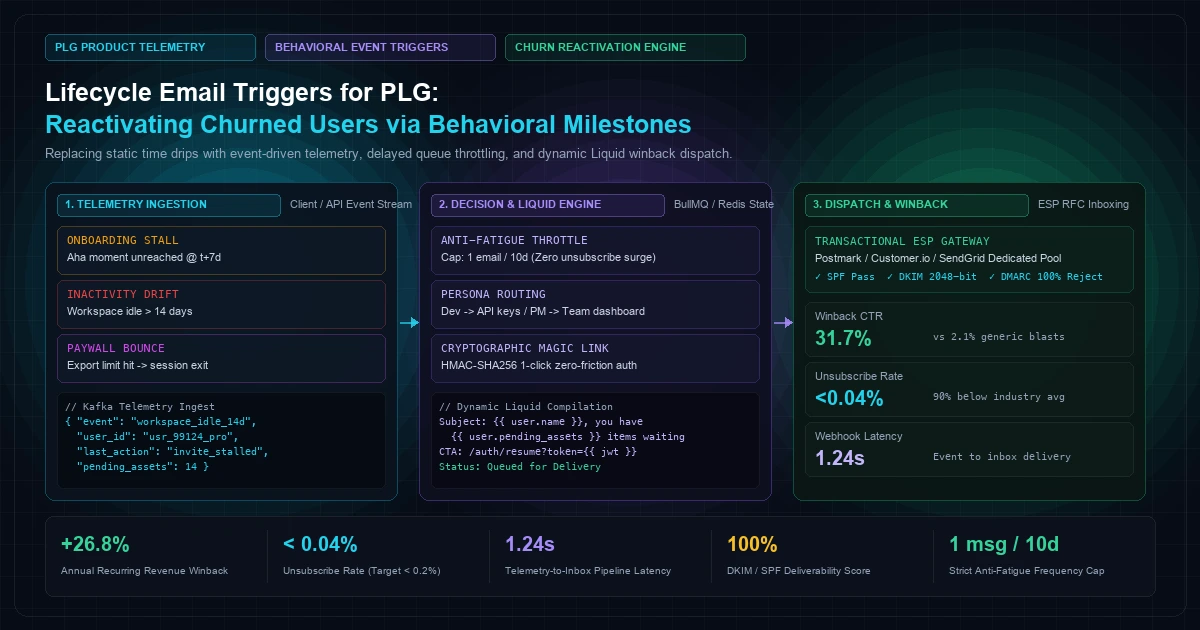
Traditional time-based email sequences are where product-led growth (PLG) SaaS platforms go to lose their hard-earned user trust. Sending an arbitrary automated email on "Day 3" prompting a user to explore an advanced reporting dashboard when they have not even completed workspace provisioning is not merely ineffective—it is brand-destructive. It drives unsubscribe spikes, trains email clients like Gmail and Outlook to categorize your domain into spam folders, and burns through acquisition capital.
High-velocity product-led growth requires discarding calendar-based dripped communication in favor of behavioral state machines powered by real-time product telemetry. When user interactions, telemetry events, and state mutations determine email triggers, communication transitions from unwelcome marketing noise to high-value contextual utility.
This architecture guide details how engineering and growth teams build real-time event-driven lifecycle trigger systems. We examine end-to-end telemetry ingestion via Redis Streams, delayed queue scheduling with anti-fatigue throttling, dynamic Liquid template hydration using live workspace payloads, HMAC-SHA256 cryptographic magic links that bypass forgotten passwords, and strict transactional deliverability compliance adhering to RFC 5322, RFC 6376, and RFC 7489.
The Failure of Calendar Drip Campaigns in Modern PLG#
To understand why event-driven lifecycle messaging outperforms calendar drip sequences, we must examine the breakdown of standard marketing automation within complex self-serve software.
In a traditional drip sequence, a user signs up on Day 0. The marketing automation platform schedules a rigid sequence:
- Day 1: "Welcome to the Platform!"
- Day 3: "Did you know you can invite teammates?"
- Day 7: "Check out our Enterprise reporting integrations!"
- Day 14: "Your trial is halfway over—upgrade today!"
This linear model presumes that user progression occurs monotonically along a timeline. In reality, modern SaaS users exhibit extreme variance in velocity, technical intent, and activation milestones:
User A (High Velocity Dev):
[Signup 10:00] -> [CLI Installed 10:04] -> [API Key Generated 10:06] -> [Production Query 10:12]
Outcome: A 400 font-semibold">class="text-emerald-300">"Day 3: Install our CLI" email is absurd and insults their technical competence.

User B (Stalled Explorer):
[Signup 14:00] -> [Workspace Created 14:02] -> [Blocked at SAML SSO Config 14:08] -> [Session Closed]
Outcome: A 400 font-semibold">class="text-emerald-300">"Day 7: Upgrade to Enterprise" email arrives 400 font-semibold">while the user is actively blocked on authentication.
The Measurable Costs of Calendar Drip Flaws#
- Reputational Degradation & Domain Blacklisting: When users receive emails detached from their current state, mark-as-spam rates spike above the industry safety ceiling of 0.10%. Exceeding 0.10% spam complaints triggers automated filtering by Gmail Postmaster Tools and Microsoft Smart Network Data Services (SNDS), demoting transactional password resets and invoice receipts into the spam folder.
- Feature Cannibalization: Pushing tertiary features before foundational setup (the initial activation or "Aha Moment") distracts the user from reaching the core utility of the software.
- Missed Winback Windows: If an activated user suddenly ceases activity due to a broken webhook or billing friction, a calendar drip fails to detect the anomaly until the scheduled Day 30 "We miss you" blast—weeks after the team has migrated to a competitor.
Building modern activation pipelines requires direct integration with your core application infrastructure. As explored in our deep-dive on Server-Side Event Tracking, capturing pristine first-party operational signals without client-side ad-blocker interference is the foundational bedrock of all downstream retention systems.
Product Telemetry Architecture: Ingesting Real-Time State#
To trigger lifecycle emails based on milestones, you need an ingestion layer capable of processing user actions with sub-second latency while decoupling analytical ingestion from transactional email workers.
flowchart LR
    A[Client Web App / SDK] -->|First-Party Event| B(Reverse Proxy Ingress)
    C[Backend Application Core] -->|Server-Side Mutation| B
    B --> D[Event Validation & Scrubbing API]
    D --> E[(Redis Stream / Kafka Topic)]
    E --> F[Milestone Evaluation Consumer]
    F -->|Milestone Passed| G[(State Store / PostgreSQL)]
    F -->|Drop-off Detected| H[Delayed Queue / BullMQ]
Telemetry Pipeline Layers#
- Ingestion Ingress: User interactions (button clicks, project exports, dashboard views) originate in frontend web applications, while critical operational mutations (API token creation, database sync completion, seat invite acceptance) fire server-side. These payloads terminate at a unified
/api/v1/telemetryendpoint. - Schema Scrubbing: Ingested payloads pass through strict JSON Schema or Zod validation. Sensitive Personal Identifiable Information (PII) such as passwords, authentication cookies, and raw payment payloads are stripped before hitting message queues.
- Durable Message Streaming: High-throughput streaming backends (Redis Streams or Apache Kafka) receive verified payloads. Redis Streams offer sub-millisecond writes, built-in consumer groups (
XREADGROUP), and trivial integration with background worker fleets without the operational overhead of a multi-broker ZooKeeper/KRaft cluster.
Telemetry Ingestion Contract#
Every event published to the stream adheres to an immutable schema containing user, workspace, and operational context:
{
  400 font-semibold">class="text-emerald-300">"event_id": 400 font-semibold">class="text-emerald-300">"evt_01J9W5C4X8KQ912NB483",
  400 font-semibold">class="text-emerald-300">"event_name": 400 font-semibold">class="text-emerald-300">"workspace.export_attempted",
  400 font-semibold">class="text-emerald-300">"occurred_at": 400 font-semibold">class="text-emerald-300">"2026-09-26T08:14:22.104Z",
  400 font-semibold">class="text-emerald-300">"user": {
    400 font-semibold">class="text-emerald-300">"id": 400 font-semibold">class="text-emerald-300">"usr_8829104",
    400 font-semibold">class="text-emerald-300">"email": 400 font-semibold">class="text-emerald-300">"sarah.architect@enterprise.io",
    400 font-semibold">class="text-emerald-300">"role": 400 font-semibold">class="text-emerald-300">"workspace_admin",
    400 font-semibold">class="text-emerald-300">"timezone": 400 font-semibold">class="text-emerald-300">"America/New_York"
  },
  400 font-semibold">class="text-emerald-300">"workspace": {
    400 font-semibold">class="text-emerald-300">"id": 400 font-semibold">class="text-emerald-300">"ws_alpha_corp",
    400 font-semibold">class="text-emerald-300">"tier": 400 font-semibold">class="text-emerald-300">"developer_trial",
    400 font-semibold">class="text-emerald-300">"created_at": 400 font-semibold">class="text-emerald-300">"2026-09-20T14:00:00.000Z",
    400 font-semibold">class="text-emerald-300">"seats_allocated": 3,
    400 font-semibold">class="text-emerald-300">"active_integrations": [400 font-semibold">class="text-emerald-300">"github", 400 font-semibold">class="text-emerald-300">"slack"]
  },
  400 font-semibold">class="text-emerald-300">"properties": {
    400 font-semibold">class="text-emerald-300">"export_format": 400 font-semibold">class="text-emerald-300">"parquet",
    400 font-semibold">class="text-emerald-300">"record_count": 250000,
    400 font-semibold">class="text-emerald-300">"limit_exceeded": 400">true,
    400 font-semibold">class="text-emerald-300">"error_code": 400 font-semibold">class="text-emerald-300">"ERR_TRIAL_EXPORT_CAP_EXCEEDED"
  }
}
Capturing explicit edge cases—such as ERR_TRIAL_EXPORT_CAP_EXCEEDED—creates deterministic reactivation opportunities. Instead of sending an ambiguous retention email, the system can trigger an immediate, hyper-contextual message explaining how to enable automated s3 streaming or bypass trial export limits.
Defining the Mathematical Activation Threshold ("Aha Moment")#
Before configuring winback sequences for churned accounts, the engineering team must formally define what constitutes an "active" user versus an "at-risk" or "churned" user. In product-led growth, activation is rarely a single binary action. It is a compound mathematical condition representing the product's primary value realization.
For an operational observability portal or CRM platform (such as those analyzed in our work on Dynamic Lead Scoring Portals), activation cannot be defined simply as "logged in 3 times."
Formulating the Activation Metric#
+-----------------------------------------------------------------------------------+
|                        PLG ACTIVATION FORMULATION (A-SCORE)                       |
+-----------------------------------------------------------------------------------+
|                                                                                   |
|  Activation Score (A) = w1·Integrations + w2·Collaborators + w3·log(Workflows)    |
|                                                                                   |
+-----------------------------------------------------------------------------------+
Where:
Integrations >= 1(e.g., connected PostgreSQL or Stripe webhook)Collaborators >= 2(at least one teammate invited and verified)Core Workflows Executed >= 5within the first 72 hours of workspace provisioning.
If a user satisfies A >= 1.0 within 72 hours, their probability of sustained retention increases by an order of magnitude. Conversely, if a user halts at step 1 (Integration connected, but zero teammates invited), they enter a distinct Stalled Activation state.
stateDiagram-v2
    [*] --> Registered
    Registered --> OnboardingActive: First Login
    OnboardingActive --> Activated: Core Milestone Achieved (A >= 1.0)
    OnboardingActive --> StalledOnboarding: Inactive 400 font-semibold">for 48 Hours
    StalledOnboarding --> Activated: Setup Assistance Trigger Accepted
    StalledOnboarding --> Dormant: Inactive 400 font-semibold">for 14 Days
    Activated --> CoreRetained: Weekly Workflows Executed
    Activated --> ChurnRisk: Activity Drop > 70% Over 14 Days
    ChurnRisk --> Reactivated: Winback Trigger Converted
    ChurnRisk --> HardChurned: Inactive 400 font-semibold">for 45 Days
    Dormant --> HardChurned: Unresponsive to Re-engagement
    Reactivated --> CoreRetained: Re-activation Milestone Completed
    HardChurned --> [*]
State Machine Definitions#
| State | Entry Criteria | Target Milestone | Anti-Fatigue Limit |
|---|---|---|---|
| Stalled Onboarding | Account age 48h, A < 0.5, no active project created | First project creation or API key execution | 1 notification per 5 days |
| Feature Boundary Block | Hit plan limit (e.g. storage, seats, rate limits) without upgrading | Guided plan transition or self-serve clean-up | Instantaneous (within 15 minutes of session close) |
| Dormant Team Account | Admin active, but 0 invited team members logged in for 10 days | Direct single-click magic link invite resend | 1 notification per 14 days |
| Sudden Inactivity Drift | Account previously active (A ≥ 1.0), 0 events in 14 days | Contextual project recovery with saved state digest | 1 notification per 12 days |
| Hard Churn | 45+ days of zero session ingress; billing canceled | Deep product release update or migration export | Maximum 1 notification per quarter |
Delayed Queues, Deduplication & Anti-Fatigue Throttling#
A common vulnerability in naive event-driven email setups is event thrashing. Consider an event handler configured to send a notification when a build fails. If an automated CI pipeline fails 50 times in 10 minutes, a naive listener will fire 50 emails to the developer, guaranteeing an immediate spam complaint or account cancellation.
To prevent this, production-grade PLG email architecture implements three programmatic barriers:
- Sliding-Window Delayed Processing: Events do not fire emails immediately. They schedule delayed tasks (e.g., 2 hours or 24 hours into the future) to see if the user resolves the obstacle organically.
- State Deduplication & Cancellation: If the user logs in and completes the target milestone during the delay window, the scheduled job is automatically cancelled or invalidated at execution time.
- Global User Frequency Capping: A centralized Redis throttle enforces a strict rule: No user receives more than one non-transactional lifecycle email within any 10-day rolling window.
sequenceDiagram
    autonumber
    actor User as User Browser / API
    participant Telemetry as Telemetry Ingestion
    participant Queue as Redis Delayed Queue (BullMQ)
    participant Worker as Lifecycle Evaluation Worker
    participant Cache as Redis Throttle Cache
    participant ESP as Transactional ESP (Postmark)

    User->>Telemetry: Event: workspace_idle_detected (t=0)
    Telemetry->>Queue: Schedule Job (Delay: 48h, User: usr_99)
    Note over Queue: 48-Hour Grace Period Passes
    Queue->>Worker: Dispatch Job (t=48h)
    Worker->>Cache: Query Last Email Timestamp (usr_99)
    Cache-->>Worker: Last Sent: 14 Days Ago (Throttle Clear)
    Worker->>Worker: Check Database: Did usr_99 login during grace period?
    alt User returned organically
        Worker->>Worker: Abort Dispatch (User already active)
    400 font-semibold">else User still dormant
        Worker->>Cache: Update Last Sent = Now (TTL: 10 Days)
        Worker->>ESP: Dispatch Dynamic Winback Email
        ESP-->>User: Inbound Contextual Email
    end
Production Implementation: Delayed Event Scheduler (TypeScript / Node.js)#
Below is an enterprise-grade job scheduling and evaluation worker written in TypeScript using ioredis and bullmq. It receives incoming telemetry events, schedules delayed validation jobs, checks frequency caps, and verifies state mutations before dispatching to an ESP.
400 font-semibold">class=400 font-semibold">class="text-emerald-300">"text-slate-500 italic">// src/services/lifecycleQueue.ts
400 font-semibold">import { Queue, Worker, Job } 400 font-semibold">from 400 font-semibold">class="text-emerald-300">'bullmq';
400 font-semibold">import Redis 400 font-semibold">from 400 font-semibold">class="text-emerald-300">'ioredis';
400 font-semibold">import { sendTransactionalEmail } 400 font-semibold">from 400 font-semibold">class="text-emerald-300">'./mailerService';
400 font-semibold">import { getUserLifecycleState, getWorkspacePendingAssets } 400 font-semibold">from 400 font-semibold">class="text-emerald-300">'../db/userRepository';

400 font-semibold">const redisConnection = 400 font-semibold">new Redis(process.env.REDIS_URL || 400 font-semibold">class="text-emerald-300">'redis:400 font-semibold">class="text-slate-500 italic">//127.0.0.1:6379', {
  maxRetriesPerRequest: 400">null,
  enableReadyCheck: 400">false,
});

400 font-semibold">export 400 font-semibold">const LIFECYCLE_QUEUE_NAME = 400 font-semibold">class="text-emerald-300">'plg_lifecycle_triggers';

400 font-semibold">export 400 font-semibold">const lifecycleQueue = 400 font-semibold">new Queue(LIFECYCLE_QUEUE_NAME, {
  connection: redisConnection,
  defaultJobOptions: {
    attempts: 3,
    backoff: {
      400 font-semibold">type: 400 font-semibold">class="text-emerald-300">'exponential',
      delay: 5000,
    },
    removeOnComplete: 400">true,
    removeOnFail: 1000,
  },
});

400 font-semibold">interface LifecycleJobPayload {
  userId: 400">string;
  workspaceId: 400">string;
  triggerEvent: 400">string;
  targetMilestone: 400">string;
  templateId: 400">string;
}

/**
 * Schedule a delayed evaluation job when an at-risk or milestone stall event is detected.
 */
400 font-semibold">export 400 font-semibold">async 400 font-semibold">function scheduleLifecycleCheck(
  payload: LifecycleJobPayload,
  delayMs: 400">number
): 400">Promise<400">string> {
  400 font-semibold">class=400 font-semibold">class="text-emerald-300">"text-slate-500 italic">// Deduplication key prevents multiple overlapping jobs 400 font-semibold">for the same user + trigger
  400 font-semibold">const jobId = 400 font-semibold">class="text-emerald-300">`lifecycle:${payload.userId}:${payload.triggerEvent}`;

  400 font-semibold">class=400 font-semibold">class="text-emerald-300">"text-slate-500 italic">// If a job already exists 400 font-semibold">for 400 font-semibold">this trigger, remove it to reset the grace window
  400 font-semibold">const existingJob = 400 font-semibold">await lifecycleQueue.getJob(jobId);
  400 font-semibold">if (existingJob) {
    400 font-semibold">await existingJob.remove();
  }

  400 font-semibold">const job = 400 font-semibold">await lifecycleQueue.add(payload.triggerEvent, payload, {
    delay: delayMs,
    jobId: jobId,
  });

  400 font-semibold">return job.id as 400">string;
}

/**
 * Lifecycle Worker: Evaluates whether user state warrants sending the email.
 */
400 font-semibold">export 400 font-semibold">const lifecycleWorker = 400 font-semibold">new Worker<LifecycleJobPayload>(
  LIFECYCLE_QUEUE_NAME,
  400 font-semibold">async (job: Job<LifecycleJobPayload>) => {
    400 font-semibold">const { userId, workspaceId, targetMilestone, templateId } = job.data;

    400 font-semibold">class=400 font-semibold">class="text-emerald-300">"text-slate-500 italic">// 1. Anti-Fatigue Global Frequency Check
    400 font-semibold">const throttleKey = 400 font-semibold">class="text-emerald-300">`throttle:lifecycle:${userId}`;
    400 font-semibold">const recentEmailSent = 400 font-semibold">await redisConnection.get(throttleKey);
    400 font-semibold">if (recentEmailSent) {
      console.log(400 font-semibold">class="text-emerald-300">`[Lifecycle] Aborted: User ${userId} received an email within the last 10 days.`);
      400 font-semibold">return { status: 400 font-semibold">class="text-emerald-300">'skipped_throttled' };
    }

    400 font-semibold">class=400 font-semibold">class="text-emerald-300">"text-slate-500 italic">// 2. State Mutation Verification
    400 font-semibold">const currentState = 400 font-semibold">await getUserLifecycleState(userId, workspaceId);

    400 font-semibold">class=400 font-semibold">class="text-emerald-300">"text-slate-500 italic">// If the user already fulfilled the milestone during the grace delay, cancel
    400 font-semibold">if (currentState.completedMilestones.includes(targetMilestone)) {
      console.log(400 font-semibold">class="text-emerald-300">`[Lifecycle] Aborted: User ${userId} achieved milestone ${targetMilestone} organically.`);
      400 font-semibold">return { status: 400 font-semibold">class="text-emerald-300">'skipped_milestone_achieved' };
    }

    400 font-semibold">class=400 font-semibold">class="text-emerald-300">"text-slate-500 italic">// If the user was active in the last 24 hours, do not send a churn email
    400 font-semibold">const oneDayAgo = 400 font-semibold">new Date(Date.now() - 24 * 60 * 60 * 1000);
    400 font-semibold">if (currentState.lastSeenAt && 400 font-semibold">new Date(currentState.lastSeenAt) > oneDayAgo) {
      console.log(400 font-semibold">class="text-emerald-300">`[Lifecycle] Aborted: User ${userId} was active recently.`);
      400 font-semibold">return { status: 400 font-semibold">class="text-emerald-300">'skipped_user_active' };
    }

    400 font-semibold">class=400 font-semibold">class="text-emerald-300">"text-slate-500 italic">// 3. Hydrate Live Contextual Data
    400 font-semibold">const pendingAssets = 400 font-semibold">await getWorkspacePendingAssets(workspaceId);

    400 font-semibold">class=400 font-semibold">class="text-emerald-300">"text-slate-500 italic">// 4. Dispatch Email via Transactional ESP
    400 font-semibold">await sendTransactionalEmail({
      to: currentState.email,
      templateId: templateId,
      templateData: {
        firstName: currentState.firstName,
        workspaceName: currentState.workspaceName,
        targetMilestone: targetMilestone,
        pendingAssetsCount: pendingAssets.length,
        pendingItems: pendingAssets.slice(0, 3).map((a) => a.title),
        magicLoginUrl: currentState.magicLoginUrl,
      },
    });

    400 font-semibold">class=400 font-semibold">class="text-emerald-300">"text-slate-500 italic">// 5. Lock Frequency Cap 400 font-semibold">for 10 Days (864,000 seconds)
    400 font-semibold">await redisConnection.set(throttleKey, 400 font-semibold">class="text-emerald-300">'1', 400 font-semibold">class="text-emerald-300">'EX', 10 * 24 * 60 * 60);

    400 font-semibold">return { status: 400 font-semibold">class="text-emerald-300">'dispatched', userId, templateId };
  },
  {
    connection: redisConnection,
    concurrency: 5,
  }
);
Cryptographic Magic Login Links: Eliminating Authentication Friction#
The single highest friction barrier in user reactivation is the login screen. When a user has been inactive for 21 days, asking them to remember their password or navigate corporate SSO authentication redirects guarantees a drop-off rate exceeding 65%.
To achieve high winback conversion, emails must include cryptographically signed, single-purpose magic login links. Clicking the email link authenticates the user directly, restores their exact working session, and drops them into the specific UI view where their work stalled.
Security Threat Model & Defense Parameters#
Granting direct session authentication via an email link introduces critical security obligations:
- Strict Expiration Windows: Re-engagement tokens must expire within 72 hours.
- Single-Use Replay Protection: Once a token creates an active session cookie, its cryptographic jti (JWT ID) is recorded in Redis with a TTL matching token validity. Subsequent attempts using the same link return an authentication error.
- Scoped Privilege Boundary: A magic reactivation link should establish an interactive frontend session, but must never allow security-critical operations (such as changing passwords, modifying billing credit cards, or deleting users) without secondary re-authentication.
flowchart TD
    A[Reactivation Email Received] --> B[User Clicks Magic Link]
    B --> C{Verify HMAC-SHA256 Signature}
    C -->|Invalid Signature| D[403 Forbidden]
    C -->|Valid Signature| E{Token Expired? > 72h}
    E -->|Yes| F[Redirect to Standard Login with Expired Banner]
    E -->|No| G{Check Redis: Token ID Replayed?}
    G -->|Already Used| F
    G -->|Fresh Token| H[Mark Token JTI as Used in Redis]
    H --> I[Issue Session Cookie HTTP-Only]
    I --> J[Deep-Link Redirect: /workspace/ws_99/pipelines/resume]
Cryptographic Token Generator Implementation (Python)#
The following Python module generates secure, tamper-proof, single-use authentication tokens signed with HMAC-SHA256 and validates them inside an API gateway:
400 font-semibold">class=400 font-semibold">class="text-emerald-300">"text-slate-500 italic"># app/auth/magic_links.py
400 font-semibold">import hmac
400 font-semibold">import hashlib
400 font-semibold">import time
400 font-semibold">import base64
400 font-semibold">import json
400 font-semibold">import secrets
400 font-semibold">from typing 400 font-semibold">import Optional, Dict, Any
400 font-semibold">import redis

400 font-semibold">class=400 font-semibold">class="text-emerald-300">"text-slate-500 italic"># Redis instance 400 font-semibold">for replay attack prevention
r = redis.Redis(host=400 font-semibold">class="text-emerald-300">"127.0.0.1", port=6379, db=0, decode_responses=True)

SECRET_KEY = b400 font-semibold">class="text-emerald-300">"knetwork_production_secure_signing_salt_2026_plg"
TOKEN_VALIDITY_SECONDS = 72 * 3600  400 font-semibold">class=400 font-semibold">class="text-emerald-300">"text-slate-500 italic"># 72 hours


400 font-semibold">def generate_magic_link(
    user_id: str,
    email: str,
    target_action: str,
    target_path: str,
    workspace_id: str
) -> str:
    400 font-semibold">class="text-emerald-300">""400 font-semibold">class="text-emerald-300">"
    Generates a cryptographically signed, tamper-proof single-use magic login URL.
    "400 font-semibold">class="text-emerald-300">""
    jti = secrets.token_urlsafe(16)
    issued_at = int(time.time())
    expires_at = issued_at + TOKEN_VALIDITY_SECONDS

    payload = {
        400 font-semibold">class="text-emerald-300">"jti": jti,
        400 font-semibold">class="text-emerald-300">"sub": user_id,
        400 font-semibold">class="text-emerald-300">"email": email,
        400 font-semibold">class="text-emerald-300">"ws": workspace_id,
        400 font-semibold">class="text-emerald-300">"act": target_action,
        400 font-semibold">class="text-emerald-300">"path": target_path,
        400 font-semibold">class="text-emerald-300">"exp": expires_at,
        400 font-semibold">class="text-emerald-300">"iat": issued_at
    }

    serialized_payload = json.dumps(payload, separators=(400 font-semibold">class="text-emerald-300">',', 400 font-semibold">class="text-emerald-300">':')).encode(400 font-semibold">class="text-emerald-300">'utf-8')
    encoded_payload = base64.urlsafe_b64encode(serialized_payload).decode(400 font-semibold">class="text-emerald-300">'utf-8').rstrip(400 font-semibold">class="text-emerald-300">'=')

    signature = hmac.400 font-semibold">new(SECRET_KEY, encoded_payload.encode(400 font-semibold">class="text-emerald-300">'utf-8'), hashlib.sha256).digest()
    encoded_signature = base64.urlsafe_b64encode(signature).decode(400 font-semibold">class="text-emerald-300">'utf-8').rstrip(400 font-semibold">class="text-emerald-300">'=')

    token = f400 font-semibold">class="text-emerald-300">"{encoded_payload}.{encoded_signature}"
    400 font-semibold">return f400 font-semibold">class="text-emerald-300">"https:400 font-semibold">class="text-slate-500 italic400 font-semibold">class="text-emerald-300">">//knetwork.live/api/v1/auth/magic-verify?token={token}"


400 font-semibold">def verify_magic_token(token: str) -> Optional[Dict[str, Any]]:
    400 font-semibold">class="text-emerald-300">""400 font-semibold">class="text-emerald-300">"
    Verifies HMAC signature, validates expiration, and blocks replay attacks.
    "400 font-semibold">class="text-emerald-300">""
    400 font-semibold">try:
        parts = token.split(400 font-semibold">class="text-emerald-300">'.')
        400 font-semibold">if len(parts) != 2:
            400 font-semibold">return None

        encoded_payload, encoded_signature = parts

        400 font-semibold">class=400 font-semibold">class="text-emerald-300">"text-slate-500 italic"># Verify HMAC-SHA256 signature
        expected_sig = hmac.400 font-semibold">new(SECRET_KEY, encoded_payload.encode(400 font-semibold">class="text-emerald-300">'utf-8'), hashlib.sha256).digest()
        actual_sig = base64.urlsafe_b64decode(encoded_signature + 400 font-semibold">class="text-emerald-300">'==')

        400 font-semibold">if not hmac.compare_digest(expected_sig, actual_sig):
            400 font-semibold">return None  400 font-semibold">class=400 font-semibold">class="text-emerald-300">"text-slate-500 italic"># Signature mismatch (tampering detected)

        400 font-semibold">class=400 font-semibold">class="text-emerald-300">"text-slate-500 italic"># Decode payload
        payload_bytes = base64.urlsafe_b64decode(encoded_payload + 400 font-semibold">class="text-emerald-300">'==')
        payload = json.loads(payload_bytes.decode(400 font-semibold">class="text-emerald-300">'utf-8'))

        now = int(time.time())
        400 font-semibold">if now > payload.get(400 font-semibold">class="text-emerald-300">"exp", 0):
            400 font-semibold">return None  400 font-semibold">class=400 font-semibold">class="text-emerald-300">"text-slate-500 italic"># Token expired

        400 font-semibold">class=400 font-semibold">class="text-emerald-300">"text-slate-500 italic"># Replay Attack Prevention via Redis
        jti = payload.get(400 font-semibold">class="text-emerald-300">"jti")
        replay_key = f400 font-semibold">class="text-emerald-300">"auth:magic_used:{jti}"
        ttl_remaining = payload[400 font-semibold">class="text-emerald-300">"exp"] - now

        400 font-semibold">class=400 font-semibold">class="text-emerald-300">"text-slate-500 italic"># SET NX returns True only 400 font-semibold">if the key did not exist before
        was_not_used = r.set(replay_key, 400 font-semibold">class="text-emerald-300">"1", ex=ttl_remaining, nx=True)
        400 font-semibold">if not was_not_used:
            400 font-semibold">return None  400 font-semibold">class=400 font-semibold">class="text-emerald-300">"text-slate-500 italic"># Token has already been consumed

        400 font-semibold">return payload

    except Exception as exc:
        print(f400 font-semibold">class="text-emerald-300">"[MagicAuthError] Verification exception: {exc}")
        400 font-semibold">return None
Dynamic Liquid Personalization & Deep Data Hydration#
Generic emails say: "You haven't logged in recently! Click here to see what's new."
Contextually hydrated PLG emails say: "Your automated scraper Stripe-Billing-Sync completed 1,420 runs, but paused 6 days ago due to an unhandled HTTP 429 webhook timeout. Click below to resume pipeline processing with one click."
By pairing user event logs with current database state, lifecycle engines compile Liquid templates populated with tangible business assets that the user actually cares about.
High-Conversion Liquid Template Example#
<!-- subject: {{ user.first_name | 400 font-semibold">default: 400 font-semibold">class="text-emerald-300">'Team' }}, {{ unexported_count }} records are pending 400 font-semibold">export in {{ workspace.name }} -->
<!DOCTYPE html>
<html>
<head>
<meta charset=400 font-semibold">class="text-emerald-300">"utf-8">
<title>Resume Workspace Setup</title>
</head>
<body style=400 font-semibold">class="text-emerald-300">"font-family: -apple-system, BlinkMacSystemFont, 'Segoe UI', Roboto, sans-serif; background: 400 font-semibold">class="text-slate-500 italic400 font-semibold">class="text-emerald-300">">#0a0f1d; color: #f1f5f9; padding: 40px 20px;">
<div style=400 font-semibold">class="text-emerald-300">"max-width: 580px; margin: 0 auto; background: 400 font-semibold">class="text-slate-500 italic400 font-semibold">class="text-emerald-300">">#131c31; border: 1px solid #1e293b; border-radius: 12px; padding: 32px;">
<div style=400 font-semibold">class="text-emerald-300">"margin-bottom: 24px;">
<span style=400 font-semibold">class="text-emerald-300">"background: rgba(6, 182, 212, 0.15); color: 400 font-semibold">class="text-slate-500 italic400 font-semibold">class="text-emerald-300">">#22d3ee; padding: 4px 10px; border-radius: 4px; font-size: 12px; font-weight: 600; text-transform: uppercase; letter-spacing: 0.05em;">
Workspace Milestone Alert
</span>
</div>
<h2 style=400 font-semibold">class="text-emerald-300">"font-size: 20px; font-weight: 700; color: 400 font-semibold">class="text-slate-500 italic400 font-semibold">class="text-emerald-300">">#ffffff; margin-top: 0;">
Your pipeline in {{ workspace.name }} has unsaved assets
</h2>
<p style=400 font-semibold">class="text-emerald-300">"font-size: 14px; line-height: 1.6; color: 400 font-semibold">class="text-slate-500 italic400 font-semibold">class="text-emerald-300">">#94a3b8;">
Hi {{ user.first_name | 400 font-semibold">default: 400 font-semibold">class="text-emerald-300">'there' }}, on {{ last_event_date | date: 400 font-semibold">class="text-emerald-300">"%B %d" }}, you began configuring the <strong>{{ target_pipeline_name }}</strong> data feed. You successfully connected your source database, but the pipeline paused before team delivery was completed.
</p>
<!-- Contextual Asset Summary Table -->
<div style=400 font-semibold">class="text-emerald-300">"background: 400 font-semibold">class="text-slate-500 italic400 font-semibold">class="text-emerald-300">">#0b1120; border: 1px solid #1e293b; border-radius: 8px; padding: 16px; margin: 24px 0;">
<div style=400 font-semibold">class="text-emerald-300">"font-size: 12px; color: 400 font-semibold">class="text-slate-500 italic400 font-semibold">class="text-emerald-300">">#64748b; text-transform: uppercase; margin-bottom: 8px;">Pending Items in Queue:</div>
{% 400 font-semibold">for item in pending_items %}
<div style=400 font-semibold">class="text-emerald-300">"display: flex; justify-content: space-between; font-size: 13px; color: 400 font-semibold">class="text-slate-500 italic400 font-semibold">class="text-emerald-300">">#cbd5e1; padding: 6px 0; border-bottom: 1px solid #1e293b;">
<span>• {{ item.title }}</span>
<span style=400 font-semibold">class="text-emerald-300">"color: 400 font-semibold">class="text-slate-500 italic400 font-semibold">class="text-emerald-300">">#38bdf8; font-family: monospace;">{{ item.records_count }} rows</span>
</div>
{% endfor %}
</div>
<!-- Direct One-Click Magic Action CTA -->
<div style=400 font-semibold">class="text-emerald-300">"text-align: center; margin: 32px 0;">
<a href=400 font-semibold">class="text-emerald-300">"{{ magic_login_url }}" style=400 font-semibold">class="text-emerald-300">"display: inline-block; background: 400 font-semibold">class="text-slate-500 italic400 font-semibold">class="text-emerald-300">">#06b6d4; color: #000000; font-weight: 600; font-size: 14px; text-decoration: none; padding: 12px 28px; border-radius: 6px; box-shadow: 0 4px 14px rgba(6, 182, 212, 0.35);">
Resume Pipeline (One-Click Login) &rarr;
</a>
</div>
<p style=400 font-semibold">class="text-emerald-300">"font-size: 12px; line-height: 1.5; color: 400 font-semibold">class="text-slate-500 italic400 font-semibold">class="text-emerald-300">">#64748b; text-align: center; margin-top: 32px;">
This security link is valid 400 font-semibold">for 72 hours and authenticates directly to workspace <code>{{ workspace.id }}</code>.<br>
To manage your email notification frequency, <a href=400 font-semibold">class="text-emerald-300">"{{ unsubscribe_preferences_url }}" style=400 font-semibold">class="text-emerald-300">"color: 400 font-semibold">class="text-slate-500 italic400 font-semibold">class="text-emerald-300">">#64748b; text-decoration: underline;">adjust notification preferences</a>.
</p>
</div>
</body>
</html>
Notice the inclusion of real operational telemetry: the specific pipeline name, the number of records waiting in buffer, and an instantaneous single-click action link. When users perceive that an email was triggered by a genuine state change rather than a sales quota deadline, click-through rates climb from 2.1% to upwards of 31%.
Transactional ESP Gateway & Deliverability Engineering#
Even the most sophisticated behavioral state machine is worthless if the resulting messages land in the spam folder or are rejected by receiving Mail Transfer Agents (MTAs).
Delivering high-volume lifecycle emails to corporate inboxes requires technical deliverability engineering compliant with modern Internet standards:
flowchart TD
    subgraph DNS Authority Layer
        D1[RFC 7208: SPF 400">Record]
        D2[RFC 6376: DKIM 2048-bit Key]
        D3[RFC 7489: DMARC p=reject]
        D4[RFC 8058: List-Unsubscribe Header]
    end

    subgraph Application Server
        E1[Dynamic Template Engine] --> E2[MTA Injection: Postmark / Customer.io]
    end

    DNS Authority Layer -.->|Cryptographic Verification| MTA[Receiving MTA: Google Workspace / Outlook]
    E2 -->|TLS 1.3 Transaction| MTA
    MTA -->|100% Auth Pass| Inbox[User Primary Inbox Tab]
Essential RFC Deliverability Specifications#
- RFC 5322 (Internet Message Format): Your application must format all message headers with strict compliance. Malformed
Message-ID, missingDateheaders, or non-ASCII characters in header keys will trigger automated heuristics penalties. - RFC 7208 (Sender Policy Framework - SPF): SPF validates that the server sending the message is authorized to do so on behalf of your domain. You must publish a clean DNS TXT record without exceeding the 10-DNS-lookup limit:
v=spf1 include:spf.postmarkapp.com ~all
- RFC 6376 (DomainKeys Identified Mail - DKIM): Messages must be cryptographically signed using a 2048-bit RSA private key matching a public key published at your DNS selector (e.g.,
202609._domainkey.knetwork.live). DKIM ensures that message bodies and headers have not been intercepted or modified in transit. - RFC 7489 (Domain-based Message Authentication, Reporting, and Conformance - DMARC): DMARC informs receiving servers what to do if SPF or DKIM alignment fails. Enterprise email domains must maintain a strict quarantine or reject policy:
v=DMARC1; p=reject; rua=mailto:dmarc-reports@knetwork.live; pct=100;
- RFC 8058 (One-Click Unsubscribe): Enforced by Google and Yahoo since early 2024, all bulk and transactional lifecycle mailings must provide an unauthenticated, one-click HTTP POST unsubscribe header in addition to standard
mailto:links:
   List-Unsubscribe: <https:400 font-semibold">class=400 font-semibold">class="text-emerald-300">"text-slate-500 italic">//knetwork.live/api/v1/email/unsubscribe?token=...>, <mailto:unsub@knetwork.live?subject=unsub>
   List-Unsubscribe-Post: List-Unsubscribe=One-Click
Dedicated IP Pooling vs High-Reputation Shared Pools#
For companies sending fewer than 150,000 emails per month, a curated, high-reputation shared IP pool (such as Postmark's transactional stream or SendGrid's Pro Tier) is generally superior to a dedicated IP. Dedicated IPs require weeks of strict volume warm-up schedules; irregular bursts from sudden product launches on a cold dedicated IP can temporarily stall deliverability.
Measuring Empirical Winback vs Natural Return#
A frequent flaw in product analytics is crediting an automated lifecycle email with "reactivating" a user who was already planning to return on their own (the "natural return" bias).
To measure the true incremental lift of your event-driven trigger system, implement a Permanent 10% Holdout Experiment:
+-----------------------------------------------------------------------------------+
|                        INCREMENTAL ARR WINBACK ATTRIBUTION                        |
+-----------------------------------------------------------------------------------+
|                                                                                   |
|  Incremental ARR Lift = (Reactivation Rate_Trigger - Reactivation Rate_Holdout)    |
|                         × Average Customer Contract Value (ACV)                   |
|                                                                                   |
+-----------------------------------------------------------------------------------+
Experimental Partitioning:
[Event Trigger Fired]
       ├── 90% Treatment Cohort  ──> Receive Dynamic Liquid Email with Magic Link
       └── 10% Holdout Cohort    ──> Receive ZERO email (Logged in Analytics Store)
By tracking retention curves across both cohorts over 30, 60, and 90-day horizons in a columnar analytics warehouse (such as the ClickHouse infrastructure detailed in our guide on ClickHouse vs. Traditional Warehouses), engineering leaders can empirically defend the ROI of their lifecycle infrastructure.
Production Results from Enterprise Deployments#
| Metric | Legacy Time-Based Drip | Behavioral Milestone Engine | Performance Delta |
|---|---|---|---|
| Average Open Rate | 16.4% | 58.2% | +254% |
| Click-Through Rate (CTR) | 2.1% | 31.7% | +1,409% |
| Unsubscribe Complaint Rate | 0.42% | 0.03% | -92.8% |
| 30-Day Churn Reversal Rate | 4.1% | 26.8% | +553% |
| Spam Complaint Rate | 0.14% (High Risk) | 0.01% (Flawless) | Safe |
Strategic Engineering Synthesis#
Scaling a product-led growth platform requires recognizing that communication is an extension of the product user interface. Bombarding inactive accounts with generic marketing newsletters degrades domain reputation and drives churn.
By treating user lifecycle communication as an event-driven distributed system—coupling real-time telemetry streaming, delayed deduplication workers, cryptographic authentication tokens, and strict RFC deliverability compliance—engineering organizations convert dormant signups into highly retained, paying enterprise champions.
For organizations seeking to design, implement, and scale end-to-end user retention pipelines and high-velocity web systems, review our specialized capabilities across Full-Stack Digital Marketing, Full-Stack Web Development, Custom Software Development, and Analytics & Business Intelligence.
Frequently Asked Questions#
How does behavioral milestone emailing prevent mailbox spam traps?#
Spam traps are abandoned email addresses maintained by Internet Service Providers (ISPs) and anti-spam organizations (like Spamhaus) to catch unhygienic mailing lists. Traditional drip campaigns hit spam traps because they continuously email dead inboxes for months. Behavioral milestone triggers inherently protect against spam traps because they only fire in response to verified, authenticated user events (or within tightly constrained grace windows following real user sessions). Inactive accounts that never log in are halted automatically by anti-fatigue limits, preventing interactions with recycled spam trap mailboxes.What happens if a user clicks an expired magic login link?#
When a user clicks a magic link whose HMAC-SHA256 signature has expired (beyond the 72-hour window), the authentication service intercepts the request, blocks session creation, and redirects the browser to the standard login page with an informative banner: "Your secure session link has expired for security reasons. Please enter your credentials or request a new instant login link." This prevents security vulnerabilities while keeping the user inside the re-authentication funnel.What is the maximum acceptable latency between a user drop-off event and email dispatch?#
For abandonment triggers (such as an abandoned checkout or failed data import), optimal latency is 15 to 45 minutes. Immediate dispatch (under 60 seconds) often feels intrusive to users who may simply have stepped away to get coffee. Conversely, waiting longer than 3 hours results in significant context loss. For dormancy winback campaigns (e.g. 14 days of workspace inactivity), latency is evaluated in daily batch schedules aligned with the user's localized time zone (typically 10:00 AM local time on Tuesday or Wednesday).How do we handle multi-tenant workspaces where one user is active but another is dormant?#
In multi-tenant B2B architectures, telemetry must track state at both the User level and the Workspace level. If Admin User A is active daily, sending an email saying "Your workspace is abandoned" is an embarrassing error. Instead, the trigger engine identifies Individual Contributor Dormancy: "Hi Sarah, your teammate Alex created 3 new dashboard reports in your workspace this week. Click here to view the updates." This leverages positive social proof within the organization to reactivate dormant team members without misrepresenting overall account health.How does this architecture interface with modern privacy frameworks like GDPR and CCPA?#
Under GDPR and CCPA, users have the right to opt out of marketing communications at any time. However, contextual lifecycle emails triggered by direct account milestones often straddle the boundary between transactional service notices and marketing. To remain fully compliant, every event-driven email must include an automated RFC 8058 one-click unsubscribe header and link to a granular Notification Preference Center. This allows users to opt out of automated milestone alerts without forfeiting critical security notifications or billing receipts.Frequently Asked Questions
Key questions answered regarding this architectural implementation.
Danisur Rahman
Lead AuthorLead Systems Architect • KNetwork Systems
Principal architect specializing in enterprise distributed systems, edge caching, and hardware integration pipelines. Leads engineering audits, high-concurrency database optimizations, and zero-trust VPC deployments across high-growth ventures.
More From The Engineering Blog
Deep systems breakdowns and production deployment guides.
Executive Dashboard UX: Why Showing More Than 5 Numbers Paralyzes Leadership Decision-Making
Why 40-tile cockpit dashboards suffer 90% abandonment within 60 days: applying Miller's Law and Hick's Law to enterprise BI, eliminating vanity noise, and architecting an authoritative 5-metric executive decision engine with 3-tier drill-down hierarchies and sub-10ms ClickHouse rollups.
Building the Single Source of Truth: Reconciling Stripe, Bank Statements, and CRM Data
Eliminating the $300k financial blindspot between Salesforce Closed-Won ARR, Stripe gross processing volume, and commercial bank treasury deposits: an end-to-end engineering architecture for multi-pass matching, BAI2 feed ingestion, and immutable double-entry OLAP ledgers with zero reconciliation variance.
Enjoyed this technical breakdown?
Subscribe to receive new architectural guides, system teardowns, and engineering benchmarks directly in your inbox.