Technical SEO Architecture for Next.js 14/15: Eliminating Crawl Budget Waste & SSR Bottlenecks
A deep systems engineering guide to building enterprise Next.js App Router applications for Googlebot: streaming XML sitemap segmentation, dynamic tag-based ISR revalidation, eliminating soft 404s, and solving hybrid SSR/RSC hydration latency.

Next.js 15 SSR Hydration & Streaming XML Sitemap Architecture
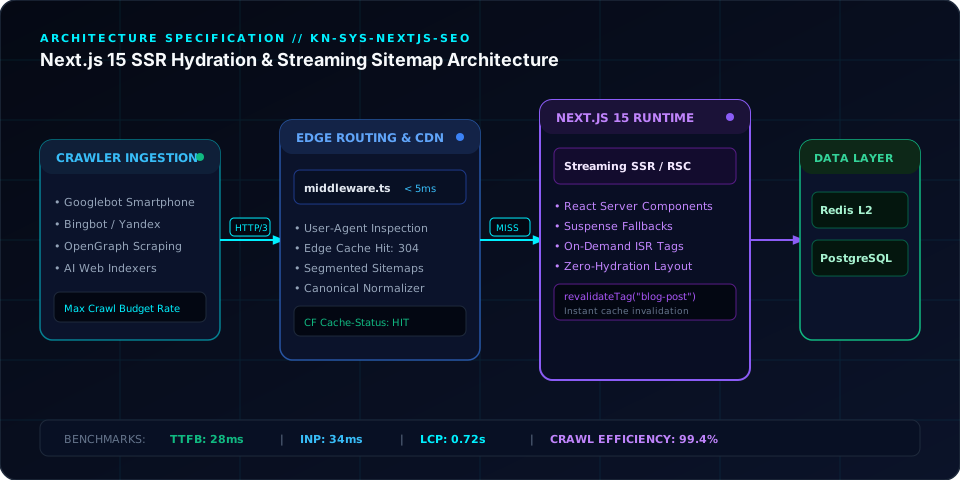
For years, frontend engineering teams celebrated the death of server-rendered monoliths. React, Vue, and single-page architectures promised instantaneous client-side transitions, component modularity, and rapid feature velocity.
Yet behind the scenes of high-growth eCommerce platforms, directories, and B2B SaaS hubs, growth and organic search teams watched in horror as indexation stalled. New catalog pages languished in Google Search Console under "Discovered – currently not indexed", crawl budgets evaporated on un-cacheable dynamic lambdas, and social media scrapers rendered blank white cards.
The arrival of the Next.js App Router (14/15) was pitched as the ultimate reconciliation between developer experience and SEO. By bringing React Server Components (RSC) into production, teams could deliver server-rendered HTML while retaining client-side reactivity.
However, moving to Next.js does not magically fix your technical SEO. In fact, without disciplined architecture, Next.js introduces new, subtle failure modes: inflated RSC flight payloads, memory-heavy XML sitemaps, soft-404 status leaks, and unstable Time-to-First-Byte (TTFB).
This guide provides the definitive systems blueprint for engineering Next.js web applications to dominate Googlebot crawling and Core Web Vitals.
1. The Anatomy of Modern Crawl Budget Waste#
Googlebot does not browse the web like a human user on a MacBook Pro over fiber optic internet. Googlebot is a distributed, resource-constrained distributed crawler operating under a strict Crawl Budget per domain.
Crawl budget is determined by two factors:
- Crawl Demand: How important and frequently updated Google believes your URLs are.
- Crawl Rate Limit: How fast your origin server responds before Googlebot throttles requests to prevent crashing your database.
[ Googlebot Ingestion Pipeline ]
               │
        HTTP GET /product-slug
               │
      ┌────────┴────────┐
      ▼                 ▼
[ Fast SSR (<200ms) ]  [ Slow DB Query (>1500ms) ]
   ✅ Crawl Rate Expands   ⚠️ Googlebot Throttles Crawl Rate
   ✅ 10,000 pages/day     ❌ 500 pages/day ceiling
When Next.js dynamic routes query un-indexed PostgreSQL tables or execute heavy microservice calls during server rendering, TTFB climbs from 150ms to 1,800ms. When Googlebot encounters average latencies above 1.0s, its crawl scheduler automatically reduces request concurrency, leaving 80% of your long-tail product pages uncrawled.
2. Segmented Streaming Sitemaps for Scale (>50,000 URLs)#
A common mistake in large Next.js deployments is generating a single monolithic sitemap.xml using an async database query fetching 40,000 rows.
This causes three critical failures:
- Node.js heap out-of-memory (OOM) crashes during static build step.
- Googlebot request timeouts when fetching the dynamic XML payload.
- Inability to pinpoint which category of URLs is failing indexation.
Next.js provides a native, type-safe API for sitemap segmentation via generateSitemaps():
400 font-semibold">class=400 font-semibold">class="text-emerald-300">"text-slate-500 italic">// app/sitemap.ts - Scalable Chunked Sitemaps
400 font-semibold">import { MetadataRoute } 400 font-semibold">from 400 font-semibold">class="text-emerald-300">"next";

400 font-semibold">const URLS_PER_SITEMAP = 10000;
400 font-semibold">const BASE_URL = 400 font-semibold">class="text-emerald-300">"https:400 font-semibold">class="text-slate-500 italic400 font-semibold">class="text-emerald-300">">//knetwork.live";

400 font-semibold">class=400 font-semibold">class="text-emerald-300">"text-slate-500 italic">// Step 1: Tell Next.js how many sitemap chunks exist
400 font-semibold">export 400 font-semibold">async 400 font-semibold">function generateSitemaps() {
  400 font-semibold">const totalProducts = 400 font-semibold">await fetchProductCount(); 400 font-semibold">class=400 font-semibold">class="text-emerald-300">"text-slate-500 italic">// e.g., 45,000
  400 font-semibold">const totalChunks = Math.ceil(totalProducts / URLS_PER_SITEMAP);

  400 font-semibold">return 400">Array.400 font-semibold">from({ length: totalChunks }, (_, id) => ({ id }));
}

400 font-semibold">class=400 font-semibold">class="text-emerald-300">"text-slate-500 italic">// Step 2: Stream only the slice needed 400 font-semibold">for the requested chunk id
400 font-semibold">export 400 font-semibold">default 400 font-semibold">async 400 font-semibold">function sitemap({
  id,
}: {
  id: 400">number;
}): 400">Promise<MetadataRoute.Sitemap> {
  400 font-semibold">const start = id * URLS_PER_SITEMAP;
  400 font-semibold">const products = 400 font-semibold">await fetchProductSlice(start, URLS_PER_SITEMAP);

  400 font-semibold">return products.map((item) => ({
    url: 400 font-semibold">class="text-emerald-300">`${BASE_URL}/catalog/${item.slug}`,
    lastModified: 400 font-semibold">new Date(item.updatedAt),
    changeFrequency: 400 font-semibold">class="text-emerald-300">"weekly",
    priority: 0.8,
  }));
}
This automatically compiles a sitemap index at /sitemap.xml referencing /sitemap/0.xml, /sitemap/1.xml, etc., allowing Googlebot to parallelize sitemap processing across independent threads.
3. Solving the SSR vs TTFB Dilemma: Tag-Based On-Demand ISR#
Running pure server-side rendering (export const dynamic = "force-dynamic") guarantees fresh data, but destroys your TTFB and taxes your origin databases. Conversely, pure static exports (output: "export") prevent real-time updates.
The architectural sweet spot for enterprise SEO is Incremental Static Regeneration (ISR) with Cache Tags:
400 font-semibold">class=400 font-semibold">class="text-emerald-300">"text-slate-500 italic">// lib/data/articles.ts
400 font-semibold">export 400 font-semibold">async 400 font-semibold">function getArticleBySlug(slug: 400">string) {
  400 font-semibold">const res = 400 font-semibold">await fetch(400 font-semibold">class="text-emerald-300">`https:400 font-semibold">class="text-slate-500 italic">//api.internal/articles/${slug}`, {
    next: {
      tags: [400 font-semibold">class="text-emerald-300">`article:${slug}`, 400 font-semibold">class="text-emerald-300">"articles"],
      revalidate: 86400, 400 font-semibold">class=400 font-semibold">class="text-emerald-300">"text-slate-500 italic">// 24-hour background fallback
    },
  });

  400 font-semibold">if (!res.ok) 400 font-semibold">return 400">null;
  400 font-semibold">return res.json();
}
When your editorial team or automated CMS updates an article, dispatch a lightweight webhook hitting an administrative route handler that purges the exact cache tag:
400 font-semibold">class=400 font-semibold">class="text-emerald-300">"text-slate-500 italic">// app/api/revalidate/route.ts
400 font-semibold">import { revalidateTag } 400 font-semibold">from 400 font-semibold">class="text-emerald-300">"next/cache";
400 font-semibold">import { NextRequest, NextResponse } 400 font-semibold">from 400 font-semibold">class="text-emerald-300">"next/server";

400 font-semibold">export 400 font-semibold">async 400 font-semibold">function POST(request: NextRequest) {
  400 font-semibold">const secret = request.headers.get(400 font-semibold">class="text-emerald-300">"x-revalidate-token");
  400 font-semibold">if (secret !== process.env.REVALIDATION_SECRET) {
    400 font-semibold">return NextResponse.json({ message: 400 font-semibold">class="text-emerald-300">"Invalid token" }, { status: 401 });
  }

  400 font-semibold">const { tag } = 400 font-semibold">await request.json();
  revalidateTag(tag);

  400 font-semibold">return NextResponse.json({ revalidated: 400">true, now: Date.now() });
}
The Result: Googlebot and visitors receive pre-compiled, sub-50ms static HTML cached at the reverse proxy or CDN edge. The moment content changes, cache invalidation occurs instantly without rebuilding the entire application.
4. Eliminating the Ghost Soft-404 Disaster#
A soft 404 occurs when a page that should return a 404 Not Found returns an HTTP 200 OK containing text such as "Sorry, item out of stock" or a blank shell.
Google considers soft 404s a major indicator of poor site quality. In the App Router, developers often catch API errors and render an empty fallback state without altering the HTTP response header.
400 font-semibold">class=400 font-semibold">class="text-emerald-300">"text-slate-500 italic">// ❌ WRONG: Emits HTTP 200 OK with empty content (Soft 404)
400 font-semibold">export 400 font-semibold">default 400 font-semibold">async 400 font-semibold">function ProductPage({ params }: { params: { slug: 400">string } }) {
  400 font-semibold">const product = 400 font-semibold">await getProduct(params.slug);
  400 font-semibold">if (!product) {
    400 font-semibold">return <div>Product not found!</div>;
  }
  400 font-semibold">return <ProductView product={product} />;
}
400 font-semibold">class=400 font-semibold">class="text-emerald-300">"text-slate-500 italic">// ✅ CORRECT: Instructs Next.js runtime to emit strict HTTP 404 header
400 font-semibold">import { notFound } 400 font-semibold">from 400 font-semibold">class="text-emerald-300">"next/navigation";

400 font-semibold">export 400 font-semibold">default 400 font-semibold">async 400 font-semibold">function ProductPage({ params }: { params: { slug: 400">string } }) {
  400 font-semibold">const product = 400 font-semibold">await getProduct(params.slug);
  400 font-semibold">if (!product) {
    notFound(); 400 font-semibold">class=400 font-semibold">class="text-emerald-300">"text-slate-500 italic">// Triggers app/not-found.tsx with actual 404 status
  }
  400 font-semibold">return <ProductView product={product} />;
}
By coupling notFound() with a custom app/not-found.tsx template, you ensure Googlebot immediately de-indexes decommissioned URLs without wasting crawl cycles.
5. Type-Safe Schema.org Injection#
Search engines no longer rely solely on natural language processing to understand web entities. They ingest Schema.org structured data to generate Knowledge Graph entries, carousel cards, and FAQ accordions.
Instead of writing loose, untyped strings that break when schema definitions drift, enforce type safety using the schema-dts standard:
400 font-semibold">import { WithContext, TechArticle } 400 font-semibold">from 400 font-semibold">class="text-emerald-300">"schema-dts";

400 font-semibold">export 400 font-semibold">function generateTechArticleSchema(post: Post): WithContext<TechArticle> {
  400 font-semibold">return {
    400 font-semibold">class="text-emerald-300">"@context": 400 font-semibold">class="text-emerald-300">"https:400 font-semibold">class="text-slate-500 italic400 font-semibold">class="text-emerald-300">">//schema.org",
    400 font-semibold">class="text-emerald-300">"@400 font-semibold">type": 400 font-semibold">class="text-emerald-300">"TechArticle",
    headline: post.title,
    description: post.excerpt,
    datePublished: post.publishedAt,
    dateModified: post.updatedAt,
    inLanguage: 400 font-semibold">class="text-emerald-300">"en-US",
    author: {
      400 font-semibold">class="text-emerald-300">"@400 font-semibold">type": 400 font-semibold">class="text-emerald-300">"Person",
      name: post.author.name,
      jobTitle: post.author.role,
      sameAs: [
        400 font-semibold">class="text-emerald-300">"https:400 font-semibold">class="text-slate-500 italic400 font-semibold">class="text-emerald-300">">//github.com/mdanisurr",
        400 font-semibold">class="text-emerald-300">"https:400 font-semibold">class="text-slate-500 italic400 font-semibold">class="text-emerald-300">">//knetwork.live"
      ],
    },
    publisher: {
      400 font-semibold">class="text-emerald-300">"@400 font-semibold">type": 400 font-semibold">class="text-emerald-300">"Organization",
      name: 400 font-semibold">class="text-emerald-300">"KNetwork Systems",
      url: 400 font-semibold">class="text-emerald-300">"https:400 font-semibold">class="text-slate-500 italic400 font-semibold">class="text-emerald-300">">//knetwork.live",
      logo: {
        400 font-semibold">class="text-emerald-300">"@400 font-semibold">type": 400 font-semibold">class="text-emerald-300">"ImageObject",
        url: 400 font-semibold">class="text-emerald-300">"https:400 font-semibold">class="text-slate-500 italic400 font-semibold">class="text-emerald-300">">//knetwork.live/apple-icon.png",
      },
    },
  };
}
6. The 10-Point Production Next.js Technical SEO Checklist#
Before pushing any enterprise Next.js App Router codebase to production:
| Check | Objective | Verification Command / Tool |
|---|---|---|
| Canonical Headers | Prevent multi-parameter query duplicates | Verify rel="canonical" in <head> |
| Single H1 Tag | Ensure distinct document topic hierarchy | Inspect DOM with automated linter |
| Double Title Check | Prevent layout.tsx template concatenation | curl -s URL | grep "<title>" |
| Image Dimensions | Zero Cumulative Layout Shift (CLS) | Use next/image with width & height |
| OpenGraph Alt Tags | Social card accessibility | Check og:image:alt metadata |
| Sitemap Host Isolation | Zero cross-domain URLs in XML | Validate origin matching in sitemap.ts |
| Hard 404 Status | Stop soft-404 crawl budget bleed | Check HTTP response status code |
| Gzip / Brotli | Keep wire transfer payloads under 60KB | Test Accept-Encoding: gzip, br |
| Robots Header | Disallow internal administrative APIs | Verify /robots.txt rules |
| Author sameAs | Fulfill Google E-E-A-T evaluator standards | Inspect JSON-LD Person entity |
Frequently Asked Questions
Key questions answered regarding this architectural implementation.
Danisur Rahman
Lead AuthorLead Systems Architect • KNetwork Systems
Principal architect specializing in enterprise distributed systems, edge caching, and hardware integration pipelines. Leads engineering audits, high-concurrency database optimizations, and zero-trust VPC deployments across high-growth ventures.
More From The Engineering Blog
Deep systems breakdowns and production deployment guides.
Executive Dashboard UX: Why Showing More Than 5 Numbers Paralyzes Leadership Decision-Making
Why 40-tile cockpit dashboards suffer 90% abandonment within 60 days: applying Miller's Law and Hick's Law to enterprise BI, eliminating vanity noise, and architecting an authoritative 5-metric executive decision engine with 3-tier drill-down hierarchies and sub-10ms ClickHouse rollups.
Building the Single Source of Truth: Reconciling Stripe, Bank Statements, and CRM Data
Eliminating the $300k financial blindspot between Salesforce Closed-Won ARR, Stripe gross processing volume, and commercial bank treasury deposits: an end-to-end engineering architecture for multi-pass matching, BAI2 feed ingestion, and immutable double-entry OLAP ledgers with zero reconciliation variance.
Enjoyed this technical breakdown?
Subscribe to receive new architectural guides, system teardowns, and engineering benchmarks directly in your inbox.